01  ·  Goal

Let the shopper turn the piece in her hand before she buys it

A photo shows jewellery from one angle, under one light. We built a 3D product view for the Golden Folklore Yellow Wristwear that runs right inside the product page. The shopper can rotate the cuff, see the heart-cut stones catch the light up close, and switch from showroom light to evening light. It works on a phone without an app, and it sits on top of the existing photo gallery rather than replacing it.

Loading the 3D view…
LIVE  ·  Try it here

This is the real product page, running inside the proposal

Everything in the phone works exactly as it would for a shopper. Try these:

  • 01
    Drag the cuff to turn it. Pinch or scroll to zoom in.
  • 02
    Tap a black dot on the piece to read about that part.
  • 03
    Tap "Stones" to turn a single heart-cut stone up close.
  • 04
    Slide the light on the left from Showroom to Evening.
  • 05
    Scroll inside the phone to see the rest of the page.
Open full screen →
360°Drag to rotate, pinch to zoom, on mobile and desktop
4Lighting moods, from showroom to evening
3Tappable story points on the piece itself
0Apps or plugins needed. It runs in the browser
GOAL 01 · SEE IT FROM EVERY SIDE

Show the full shape of the cuff, including the open back that photos rarely explain.

GOAL 02 · SEE THE SPARKLE

Let the shopper inspect a single stone up close and watch it throw light as it turns.

GOAL 03 · SEE IT IN HER LIGHT

Show how 18k gold plating looks in daylight, golden hour and evening, not just in a white studio.

GOAL 04 · KEEP HER ON THE PAGE

Give the shopper something to play with, so she spends longer with the product and closer to the buy button.

02  ·  Why 3D

What still photos can't tell a shopper

The live page for the Golden Folklore Yellow Wristwear sells a ₹4,799 statement cuff with five still photos. They're good photos, but each one answers only part of what a shopper wants to know before paying.

GAP 01  ·  SHAPE AND FIT
Answered by 01, 02, 05 →

A flat photo doesn't explain how an open cuff sits on the wrist

"Open cuff, one size, adjustable" is a line of text. Whether the opening sits at the back, how wide it is and how the stones run along the front are all things a shopper has to piece together from separate angles.

GAP 02  ·  STONE QUALITY
Answered by 02, 03 →

Sparkle is movement, and a photo is still

The heart-cut stones are the reason to buy this piece. In a still image they read as small white shapes. What a shopper is really judging, the way the facets flash as the piece moves, is exactly what a photo can't show.

GAP 03  ·  COLOUR OF THE GOLD
Answered by 04 →

Studio light is the only light the shopper ever sees

Yellow gold looks different in daylight, at golden hour and under evening lights. "Will this look too yellow on me at a dinner?" is a real question with no answer on the page today.

03  ·  The 3D View

Six features, each with a job

For each one: why it's on the page, and why it looks the way it does. The viewer uses Isharya's own look: Epilogue type, the burgundy accent and soft frosted-glass controls that sit over the product without hiding it.
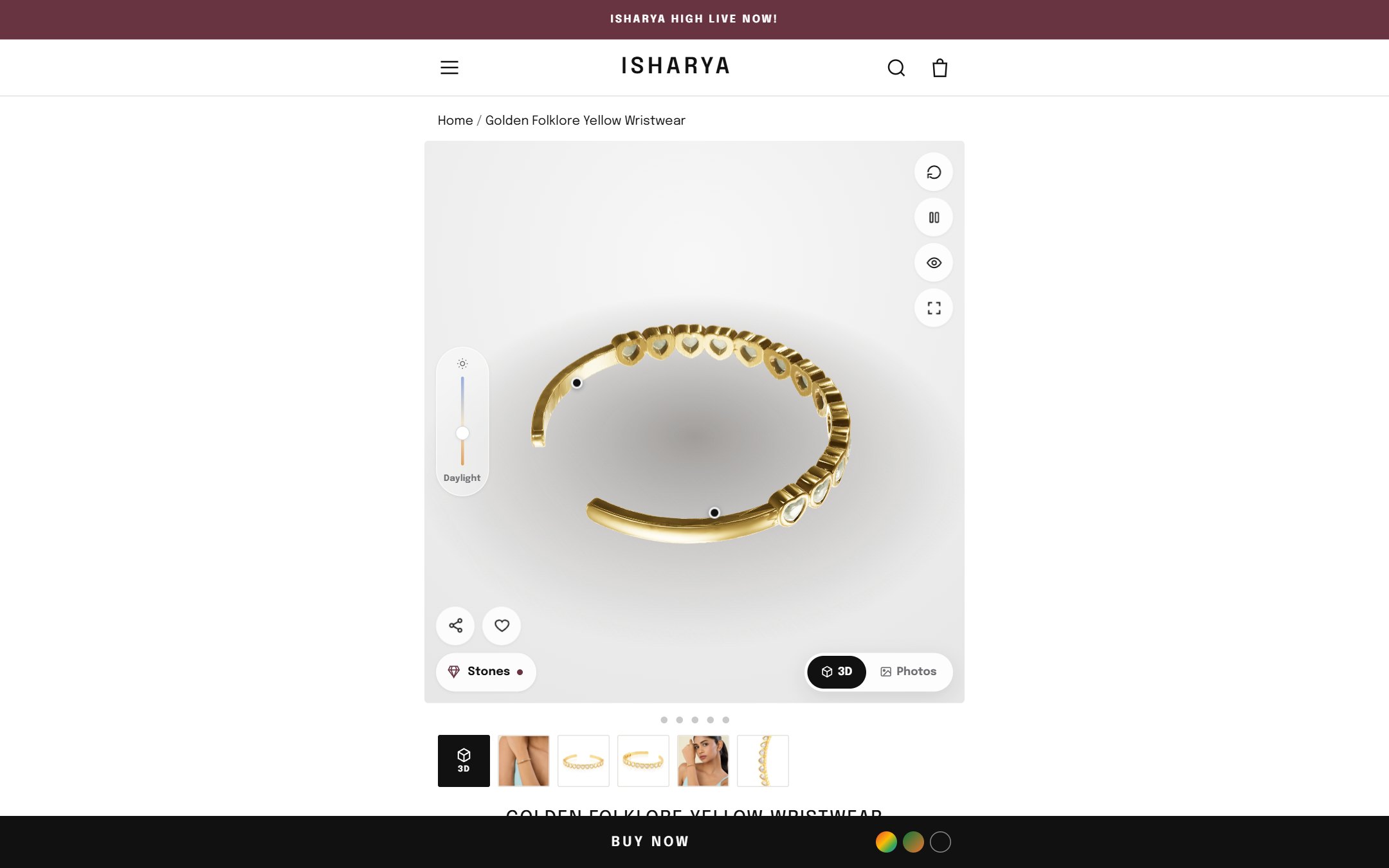
3D product view on desktop, first screen
Desktop, first screen. The 3D model is the first thing in the gallery.
01

A 3D-first gallery

WHY IT'S THERE
  • The model loads in the first slide, turning slowly on its own, so the full shape of the cuff is visible before the shopper touches anything.
  • Drag to rotate, pinch to zoom. The gestures a shopper already uses on her phone, with a one-line hint on the viewer.
  • A "3D" tile leads the thumbnail strip, so it's clear this is part of the gallery, not a separate feature to find.
DESIGN REASON
  • A soft grey stage with a floor shadow keeps the gold as the only warm colour in the frame, and the shadow makes the piece feel like it's resting on a counter.
  • All controls sit at the edges, so the centre of the frame belongs to the product.
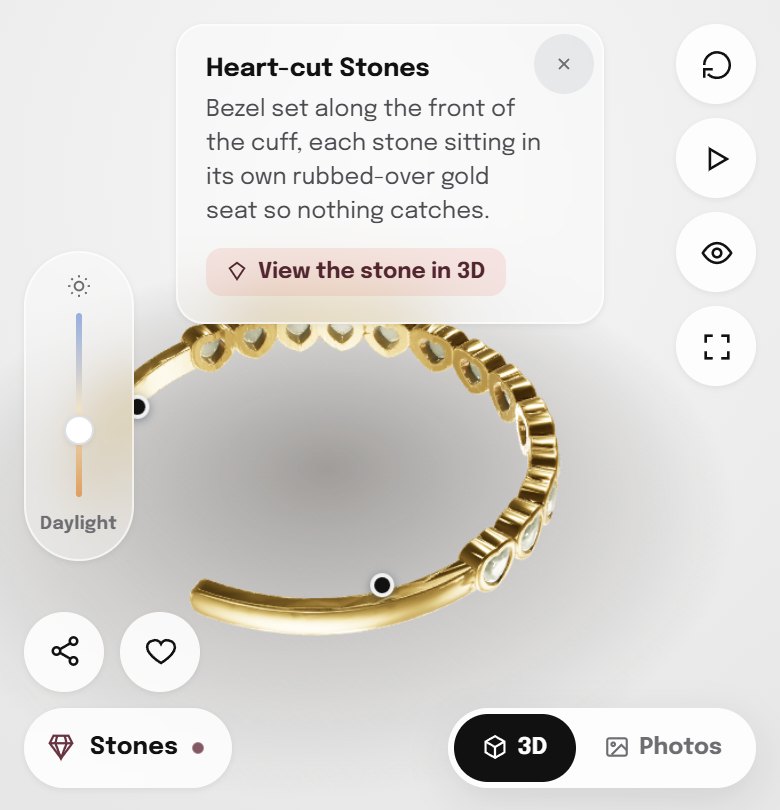
Hotspot open on the heart-cut stones
Story point, open. One tap on the stones.
02

Story points on the piece

WHY IT'S THERE

Three dots sit on the model itself: Heart-cut Stones, 18k Gold Plating and Open Cuff. Each opens a two-line note about that exact part. The product description moves from a paragraph below the fold to the spot on the piece it describes.

The stones note has a "View the stone in 3D" button that leads straight into the stone close-up.

DESIGN REASON
  • The dots turn with the model and hide when they rotate behind the cuff, so they always point at the real part.
  • A "hide points" button clears them for shoppers who just want to look.
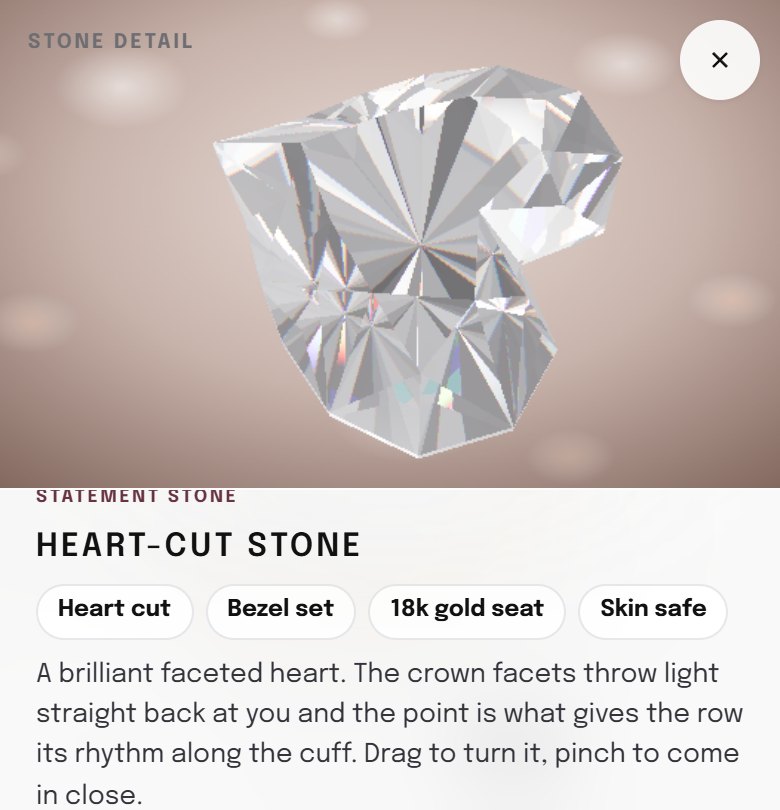
Heart-cut stone close-up in 3D
Stone detail. A single stone, rotating, with its specs.
03

A close-up of a single stone

WHY IT'S THERE

The "Stones" button opens one heart-cut stone at full size. The shopper can turn it and zoom in, and the facets flash and split light into small rainbow edges the way a real cut stone does. It's the closest a screen gets to tilting the piece under a store light.

DESIGN REASON
  • Light is traced through the stone, not painted on, so the sparkle changes as it turns instead of looping.
  • Four spec chips (heart cut, bezel set, 18k gold seat, skin safe) under the stone keep the facts next to the visual.
  • A warm, blurred backdrop separates the close-up from the main viewer, so it reads as zooming in, not a new page.
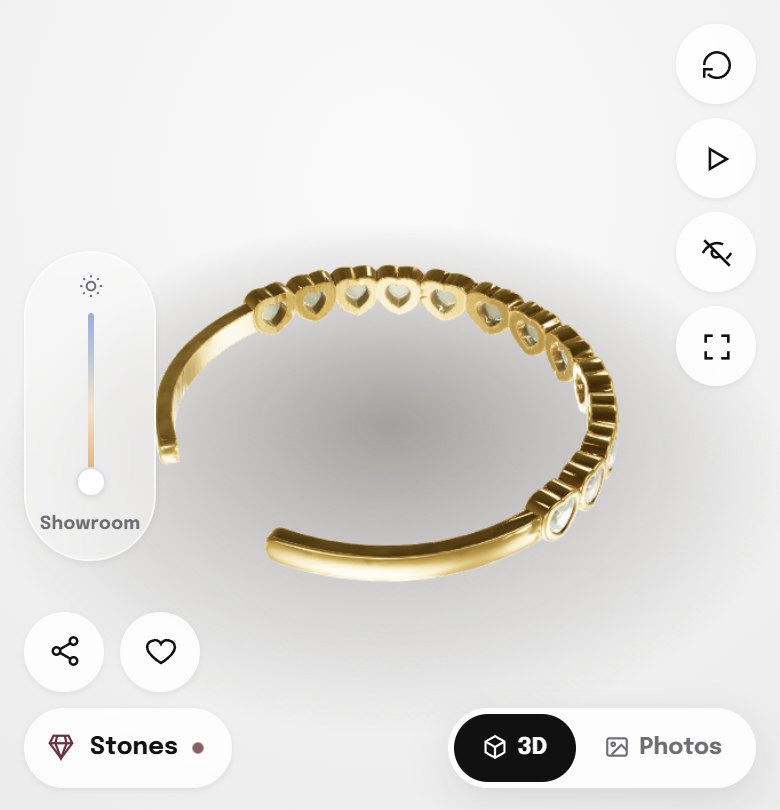
04

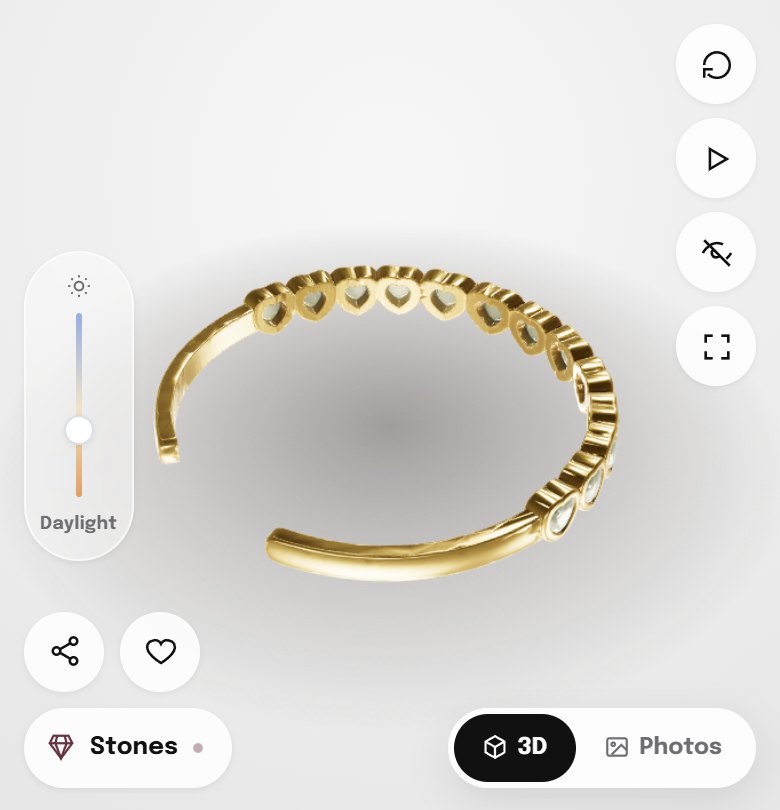
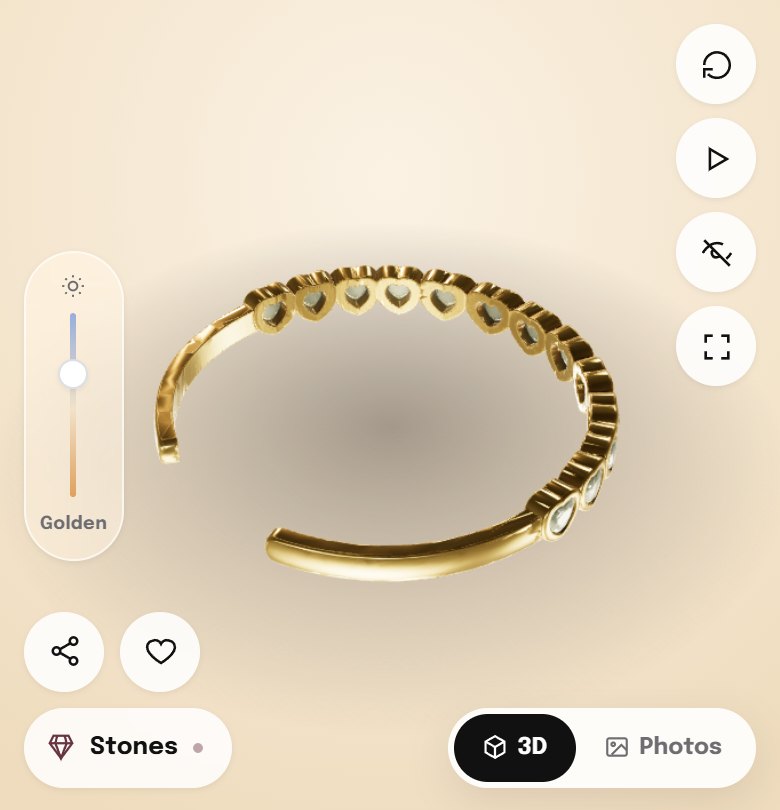
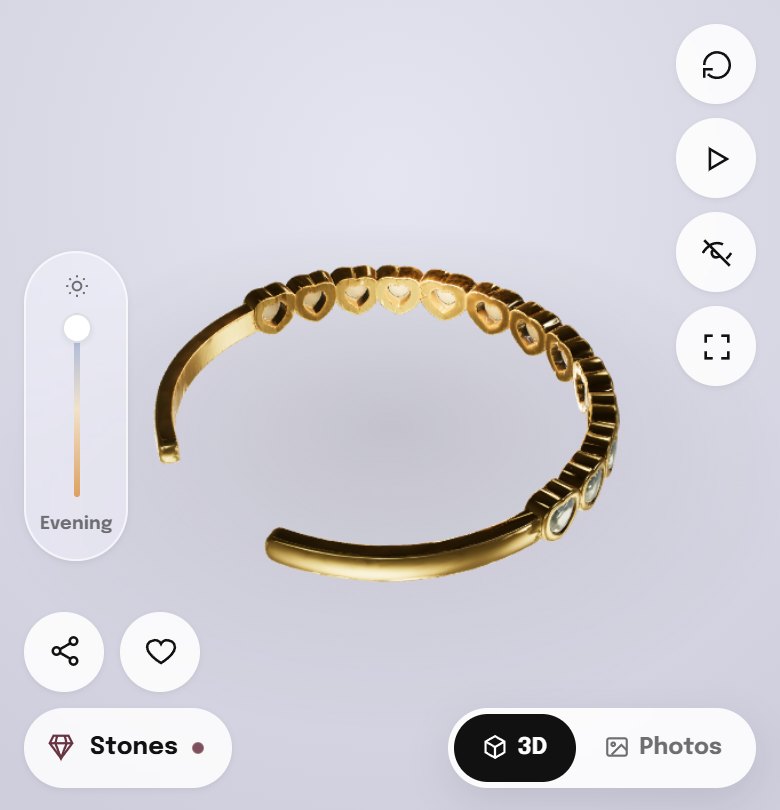
A lighting slider, from showroom to evening

Cuff under showroom light
Showroom
Cuff under daylight
Daylight
Cuff under golden hour light
Golden
Cuff under evening light
Evening
WHY IT'S THERE

One vertical slider moves the scene through four lighting moods. The gold, the stones and the background all shift together, so the shopper sees how the cuff looks at a lunch, at golden hour and at an evening event, not only in a white studio.

DESIGN REASON

A single slider rather than four buttons, so the change is smooth and invites play. The track runs from warm to cool and names the current mood underneath, so the shopper always knows which light she's looking at.
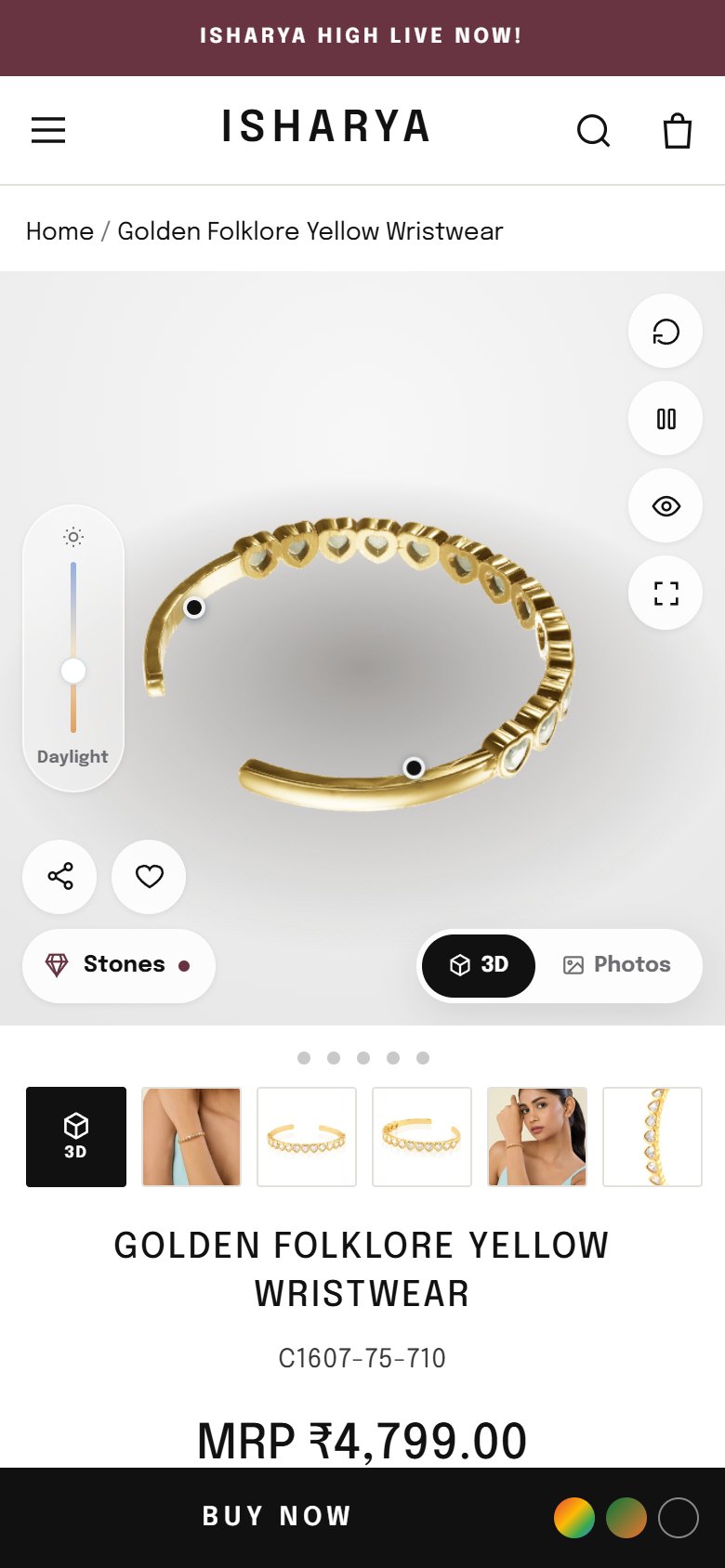
3D product view on mobile, first screen
Mobile, first screen. Viewer, controls and a sticky Buy Now.
05

Simple controls, built for a phone

WHY IT'S THERE
  • Reset view brings the cuff back to its starting angle if the shopper gets lost.
  • Pause rotation holds a view still for a closer look.
  • Fullscreen fills the phone with the product.
  • Share and wishlist stay on the viewer, so a shopper can send it to a friend without leaving.
DESIGN REASON
  • Round frosted buttons in a column on the right, with the lighting slider on the left, so thumbs reach both without covering the piece.
  • Dragging the model doesn't scroll the page, so rotating the cuff never accidentally jumps the shopper down the page.
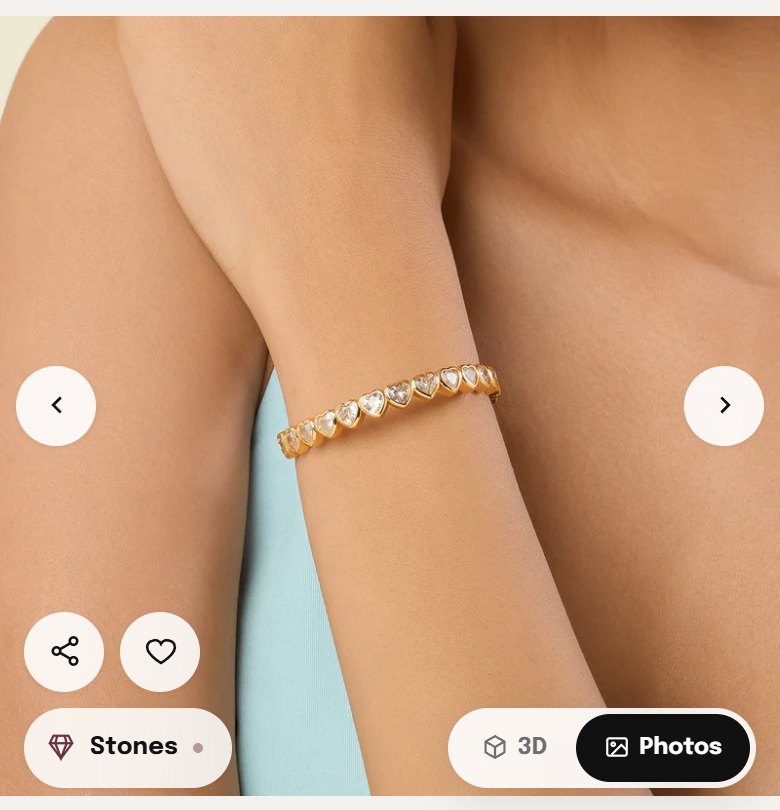
Photos mode showing the cuff on the wrist
Photos mode. The original photos, one tap away.
06

The photos stay one tap away

WHY IT'S THERE

3D shows the piece, but an on-wrist photo shows the person. A "3D / Photos" switch keeps Isharya's existing product and model photography exactly where it was, so nothing is lost by adding the viewer.

DESIGN REASON

A two-option pill in the corner, black for the active mode, so it's always clear which view is on. The 3D view sits on top of the existing gallery, so the rest of the product page is unchanged.

BEFORE LAUNCH  ·  TO CONFIRM WITH ISHARYA
  • Model accuracy. The 3D model should be checked against the physical cuff for stone count, cuff opening and plating colour before it goes live.
  • Page speed. The model and viewer load inside the page. On the live store the viewer should load after the rest of the page, so it never slows down the first screen.
  • Older phones. The viewer already falls back to a simpler stone effect if the full one can't run. We'd test on the lowest-end devices in Isharya's traffic and default those to photos if needed.
04  ·  Rollout

Prove it on one hero piece, then build a 3D catalogue

The viewer is a reusable Shopify section. Once it's proven on this cuff, adding another product means creating its 3D model and its three story points. The viewer itself doesn't change.

01

Add the viewer to the live PDP on a duplicate theme

Built as a Shopify section that sits on top of the existing gallery, so the live storefront is untouched until Isharya has reviewed it.

START HERE →
02

A/B test 3D-first against photos-first

Split traffic on the Golden Folklore Yellow Wristwear between the current gallery and the 3D view, and compare add-to-cart rate, conversion and time on page.

Test phase
03

Extend to stone-led bestsellers

Cuffs, rings and tennis pieces, where the stones are the reason to buy, get the most from 3D. Each needs a model, its story points and its stone close-up.

After the test
04

Reuse the models across channels

The same 3D files can power ad creatives, collection page previews and try-on features later, so the investment in each model keeps paying back.

Ongoing
Add-to-cart rate3D view vs photos-only gallery
Conversion rateSessions that end in an order
EngagementShare of shoppers who rotate, open the stone or move the light
ReturnsFewer "not what I expected" returns
05  ·  Why Troopod

100+ brands, real results

Troopod is run by operators who have built and scaled billion-dollar consumer businesses from scratch.

100+Brands powered
Full-stackStrategy, design, dev, CRO
25%Average conversion upside across Troopod CRO engagements
75%Experiment success rate across Troopod's CRO work

Recently working with, among others:

TanishqDurexBombay Shaving CompanyEssor GroupWellbeing Nutrition
Neeraj JoshiCEO, Troopod

Early product at Spinny. Built an internal CRM that lifted team efficiency by 10x.

Rahul BholaCTO, Troopod

Tech at Lenskart. Built a backend retail system scaled to 10 million plus customers.

Vinit SinghBusiness Lead, Troopod

Early growth at Spinny. Now driving growth for 100+ consumer brands at Troopod.